Change the game,not the build.
Flip a flag and the game changes while people are playing it. The panel below runs a real Unity build, so try it. An open-source Unity package for Flagsmith, WebGL included.


Unity WebGL, 5 MB. It plays itself until you tap or press Space.
Flags live, no rebuild
Events from the game
- Tap the game to take over. Your first run sends events here.
This is the real package running in WebGL. The page answers for the Flagsmith server, so the panel's flags are yours alone and reach the game on its next 2-second refresh. The tutorial A/B test is real: when Flagsmith Cloud answers, it picks your hint and counts whether you finish your first run, under a random anonymous id. 0 requests answered
Flagsmith has no Unity SDK.
Its FAQ points Unity developers to the .NET SDK. That SDK polls and sends events with System.Threading.Timer, Task.Run and Task.Delay, and Unity's WebGL player has no threads for them to run on. That comes from reading the SDK's source; we have not run it in a WebGL build.
The Flagsmith team's own "Unity SDK" issue, opened in March 2024, was closed as not planned in November 2026. Firebase Remote Config, Statsig, ConfigCat and Unity's Remote Config all support Unity.
Flagsmith for Unity runs on Unity's main thread with UnityWebRequest, caches the last good flags on disk, and speaks Flagsmith's new Experimentation API. Issue #3623 · the FAQ
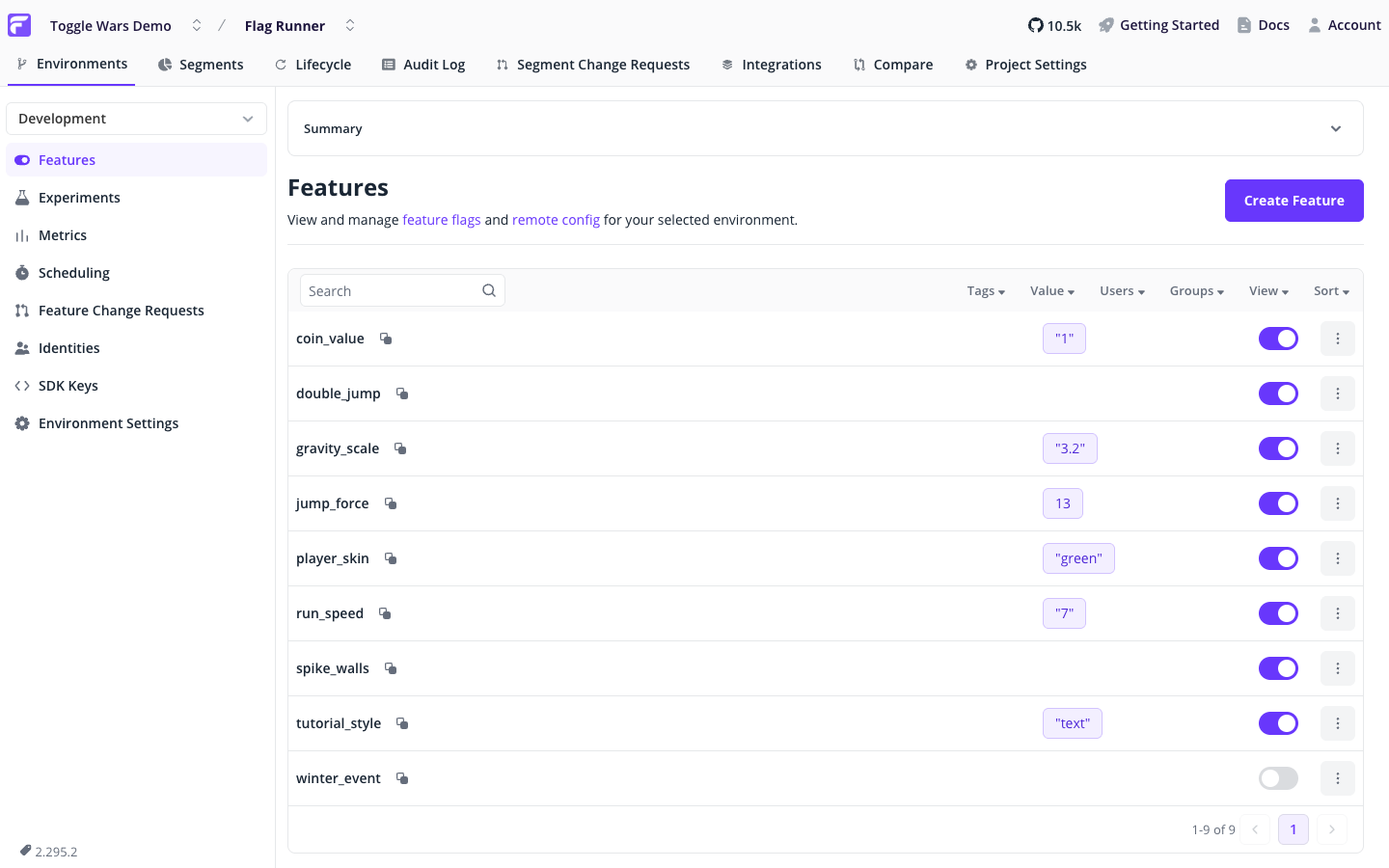
server/demo.py edits flags. Speed, the skin, a winter event and the spike walls all change mid-run.Kill switch: on
Spike walls broken in production? Turn the flag off and every running copy of the game drops them on its next refresh.
The store never sees a patch. This switch drives the playground above too.

Someone edits a flag
In the Flagsmith dashboard, or in Window > Flagsmith inside Unity, run_speed goes from 7 to 11.
// every 2 s while tuning, every 60 s in release
POST /api/v1/identities/
X-Environment-Key: client key

{ "feature": { "name": "run_speed" },
  "enabled": true,
"feature_state_value": "11" }[FlagsmithValue("run_speed")]
float runSpeed = 7f; // now 11
void Start() => flagsmith.Bind(this);
flagsmith.FlagsChanged += flags =>
ShowCaption("run_speed 7 -> 11");
- Edit
- Refresh
- Bind
- Play
A/B test it on half the players
Call GetExperimentFlag at the moment a player sees the thing under test, and TrackEvent when they succeed. Flagsmith Experimentation does the statistics.
var tut = flagsmith.GetExperimentFlag("tutorial_style");
ShowTutorial(tut?.Value ?? "text");
// later
flagsmith.TrackEvent("first_run_complete");
Exposures are recorded only for enrolled players, and each one is sent once per session. Events are batched under the 2 MiB limit, saved to disk when the app pauses and retried after network errors.
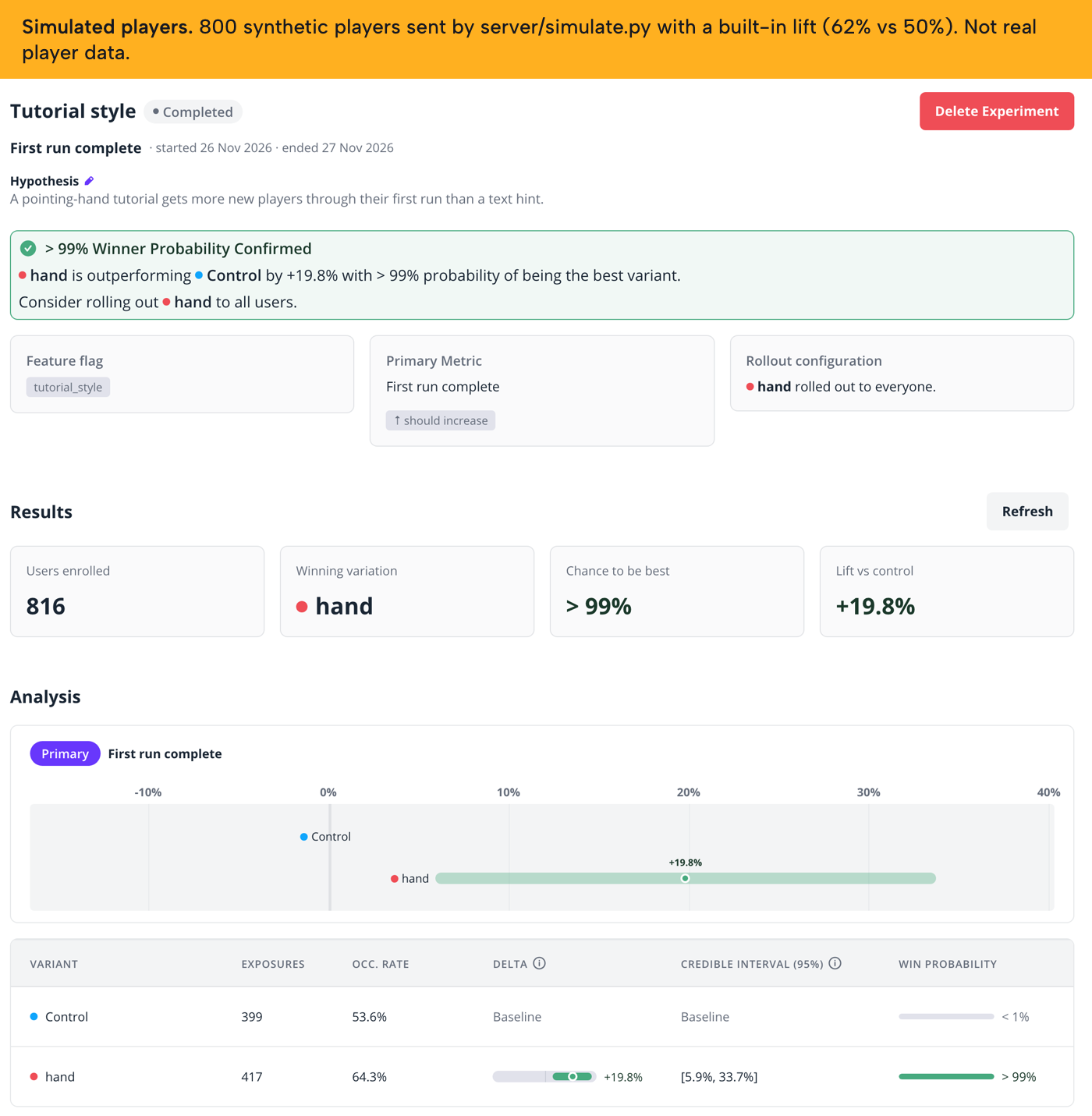
server/simulate.py. The rule (95% chance to be best, 200+ players per arm) was fixed before the second batch of players. It passed, so a coding agent shipped hand to everyone. The lift is simulated on purpose; it says nothing about real players.Tune it without leaving Unity
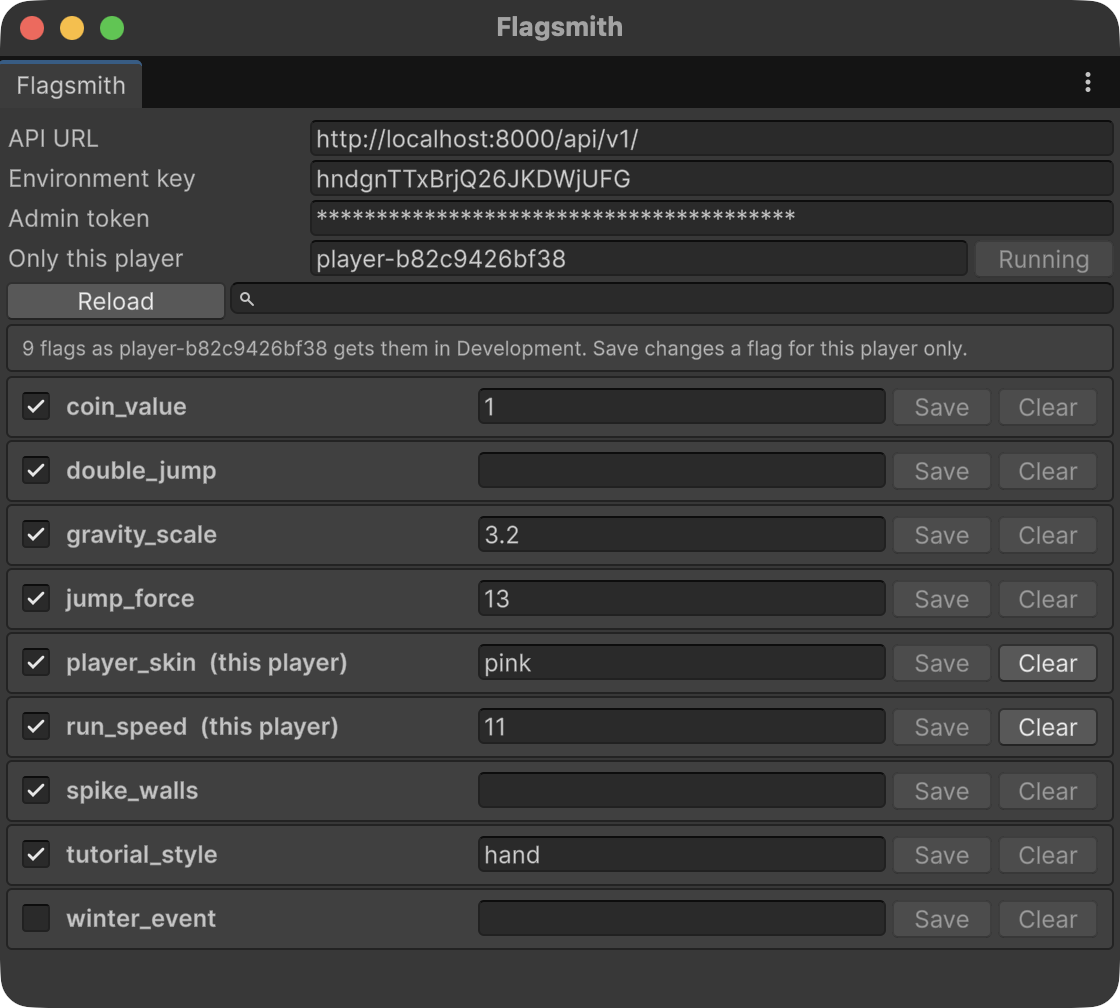
Window > Flagsmith lists an environment's flags. Flip a toggle or edit a value, press Save, and the game in Play mode picks it up on its next refresh.
Enter a player ID and the same window changes a flag for that player only: one tester's phone, or the game you are running.
The admin token lives in EditorPrefs on your machine, so it never ends up in the project or in version control.
It also runs in a released game
Flag Runner was written for this package. Drive Away was not: it is a released Unity game with its own remote values and no server to fetch them from.
In a local build, one 56-line script feeds those values from Flagsmith. Setting season_force to 2 starts the game's Christmas season in the middle of a run.
This is a test build. The version on the stores does not contain Flagsmith.
season_force changes five seconds into the run, and the run is not restarted.What has been checked
Tested against self-hosted Flagsmith 2.295.2. The docs list what isn't tested yet.
UnityWebRequest and Awaitable. No native pluginsFrom installto a shipped A/B test
Full guideAdd the package
Package Manager > + > Install package from git URL. Unity 6 or newer.
https://github.com/Harindulk/flagsmith-unity.git?path=/com.flagsmith.unityCopy your client key
Flagsmith > your environment > SDK keys. Never a ser. key.
Environment Key: your-client-keyAdd the component
On a GameObject in your first scene. Paste the key; leave the API URL for Flagsmith Cloud.
Add Component > FlagsmithBehaviourBind fields to flags
A bool follows the flag's on/off state. Your initialiser is the offline default.
[FlagsmithValue("run_speed")] float runSpeed = 7f;
[FlagsmithValue("double_jump")] bool doubleJump;
void Awake() => flagsmith.Bind(this);
Or read them directly
Typed, culture-safe, with a fallback for every read.
float s = flagsmith.Flags.GetValue("run_speed", 7f);
bool on = flagsmith.Flags.IsEnabled("new_shop");
Add traits for segments
Sent with the next refresh, so segments and overrides work per player.
flagsmith.Traits["level"] = 12;Refresh every second or two
Set Refresh Seconds on the component while you tune.
Refresh Seconds: 2React to changes
Runs on the main thread, only when something actually changed.
flagsmith.FlagsChanged += f => ui.Refresh(f);Ship with 60 seconds
Every refresh is one request per player.
Refresh Seconds: 60Create the experiment
A multivariate flag, a metric on an event, and an experiment that uses both.
tutorial_style: text | handRecord the exposure
When the player actually sees the variant, not at startup.
flagsmith.GetExperimentFlag("tutorial_style");Record the outcome
Batched, saved on pause, retried after errors.
flagsmith.TrackEvent("first_run_complete");Start Flagsmith
Self-hosted 2.295.2 with Experimentation on. Local demo settings only.
cd server && docker compose up -dSeed the demo
Project, nine flags, a metric and a running 50/50 experiment.
python3 seed.pyPlay and tune
Open Sample/ in Unity, press Play, then run the scripted demo.
python3 demo.pyAdd the Agent Skill
Works with Claude Code, Codex, Cursor and other agents that load Agent Skills.
npx skills add Harindulk/flagsmith-unityAsk for the job
It installs the package, creates the flags with the Flagsmith CLI and binds your fields. Every write waits for your OK.
Set up Flagsmith in this Unity game
so I can tune it live.
Then run an experiment
The skill covers creating the flag, metric and experiment, wiring the two calls, reading the result and shipping the winner. The recorded runs cover setup and the check-and-ship half.
A/B test the tutorial and ship the winner.Add it to your Unity project with one URL.
Paste it into Package Manager > + > Install package from git URL. Newtonsoft JSON comes with it.